← Back to portfolio

Case study · AI · Business communication

Dialpad: designing trustworthy AI experiences.

I designed how AI shows up across Dialpad calls — real-time transcript, call purpose and AI summary — on desktop, iPad and mobile. The goal: help people stay present in the conversation and walk away with everything they need.

Role
Senior Product Designer
Company
Dialpad
Scope
AI features for desktop, iPad and mobile
Timeline
Feb – Oct 2023
Context
Remote · Full-time
Team
Product Manager
Engineering Manager
Product Designer
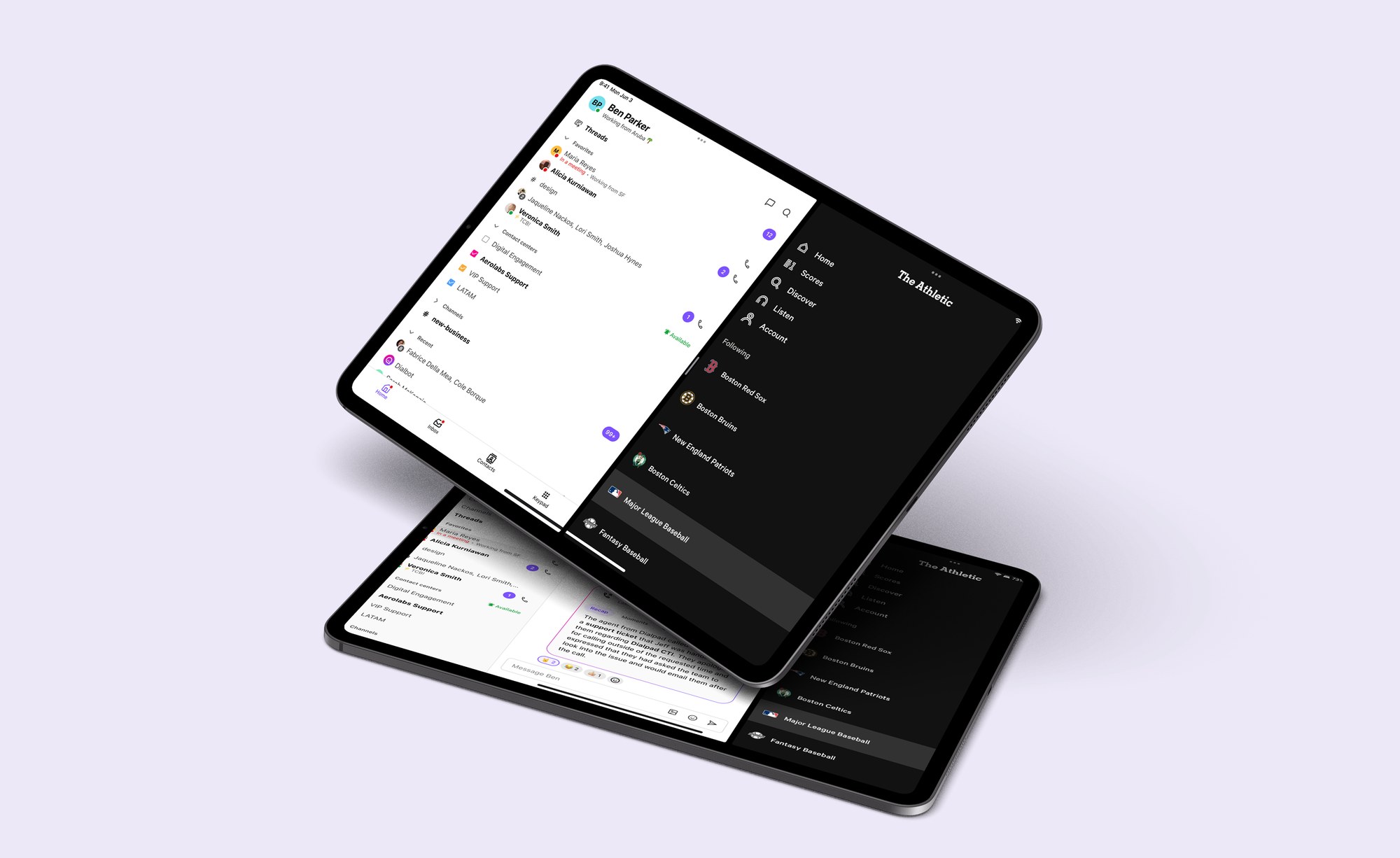
Dialpad on two iPads, side by side with The Athletic in Split View: the inbox with contacts and channels, and a chat with the AI call recap

Context & Problem

Every business conversation demands constant attention.

Users need to listen carefully, take notes, capture action items, remember decisions, understand customer sentiment and prepare follow-ups, all while staying present in the conversation. The problem wasn't building AI. It was knowing when to use it and when to stay silent.

What we set out to do:

  • Capture and understandLet AI follow the conversation, so users don't have to take notes.
  • Summarize and recommendTurn every call into a recap with clear next steps.
  • Support decisionsHelp people decide better without disrupting the conversation.

What I designed:

  • Real-time transcriptA live, rolling transcript organized by speaker.
  • AI summaryOne structured recap: summary, action items and follow-up.
  • Call purposeSemantic badges that say why a call happened.
  • Across devicesOne AI experience on desktop, iPad and mobile.

Built on (and extending) Dialpad's Design System.

Research & Discovery

What I learned before designing.

Instead of jumping into screens, I started by defining the question the feature had to answer: is this a tool that helps agents handle a conversation in real time, or one that helps managers understand what's happening across the team? Everything that follows comes from these questions.

To get there, I ran research across four fronts: I interviewed 8 users (agents and managers at contact centers) to understand their pain points and needs, spoke with stakeholders to align on the business goal, benchmarked similar products, and ran early tests to gather user feedback before committing to a direction.

Method 01

User interviews8 interviews with agents and managers at contact centers: pain points and needs.

Method 02

Stakeholder interviewsAligning on the business goal and on what success should look like for the AI features.

Method 03

Competitive benchmarkSimilar products reviewed to see which patterns already exist and where there was room to differ.

Method 04

Early testingEarly user feedback on first concepts, gathered before committing to a direction.

User journey

AI across the communication journey.

  1. Before call
    Awaiting callSystem ready and listening for an incoming or outgoing call to begin.
  2. During call
    Real-time transcriptSpeech-to-text turns audio into a live rolling transcript in under 300 ms.
    Sentiment analysisTone, intent and emotional cues extracted continuously from the transcript.
  3. After call
    Call purposeClassifies the call: sales, support, onboarding or escalation.
    SummaryA concise narrative recap of key topics, decisions and outcomes.
    Action itemsA structured list of tasks, owners and deadlines.
    Follow-upAuto-drafted emails, calendar invites or CRM entries, ready for review.

Design deep dive · 01

Real-time transcript.

Goal
Help users stay engaged by letting AI capture conversations in real time.
Challenge
Provide real-time information without distracting users from the live conversation.
Design decision
I organized the transcript around speaker hierarchy and progressive updates to reduce cognitive load.

Design principles applied

  • Low cognitive load
  • Speaker hierarchy
  • Real-time feedback
  • Design System consistency
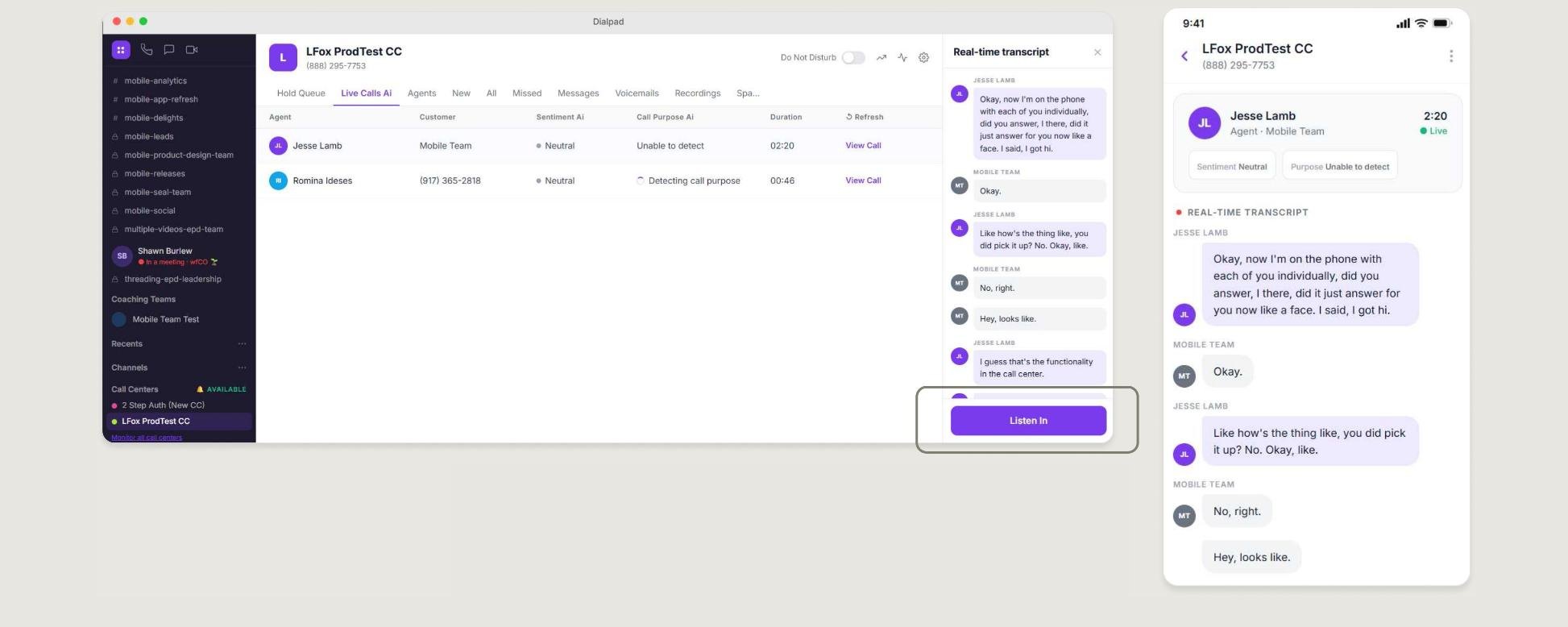
Live calls on desktop with the real-time transcript in a third column, and the same transcript on mobile
Adding a third column on desktop (collapsible at any time) helped users stay focused on the call. It also let managers read the live transcript and jump into the call if needed.

Design deep dive · 02

Call purpose.

Goal
Help users quickly understand why a conversation took place without reading the full transcript.
Challenge
Surface one or multiple AI-detected call purposes in a way that feels understandable while remaining consistent with the existing visual ecosystem.
Design decision
I extended existing Design System components by introducing semantic badges. This made the feature instantly recognizable, scalable and easy to reuse across desktop and mobile.

Design principles applied

  • Recognition over recall
  • Consistency
  • Reusability
  • Scalability
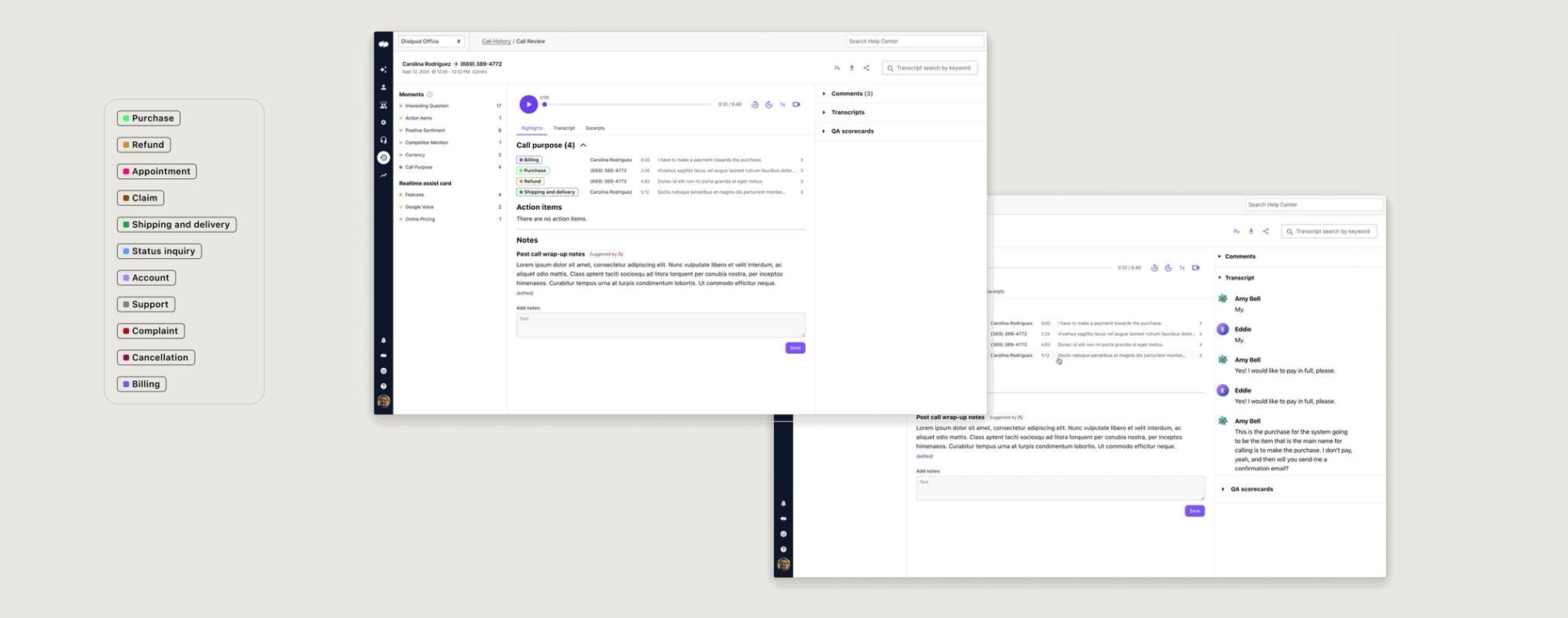
The set of call-purpose badges and the call review screen where they appear
The badge set, and how it shows up in the call review.

Design deep dive · 03

AI summary.

Goal
Provide an actionable recap that helps users understand what happened during the conversation without reading the entire transcript.
Challenge
Organize multiple AI-generated outputs into a single, structured experience.
Design decision
I grouped the outputs into a single structured summary using existing Design System patterns. This created a predictable layout while improving information hierarchy and reducing cognitive load.

Design principles applied

  • Information hierarchy
  • Progressive disclosure
  • Scannability
  • Consistency
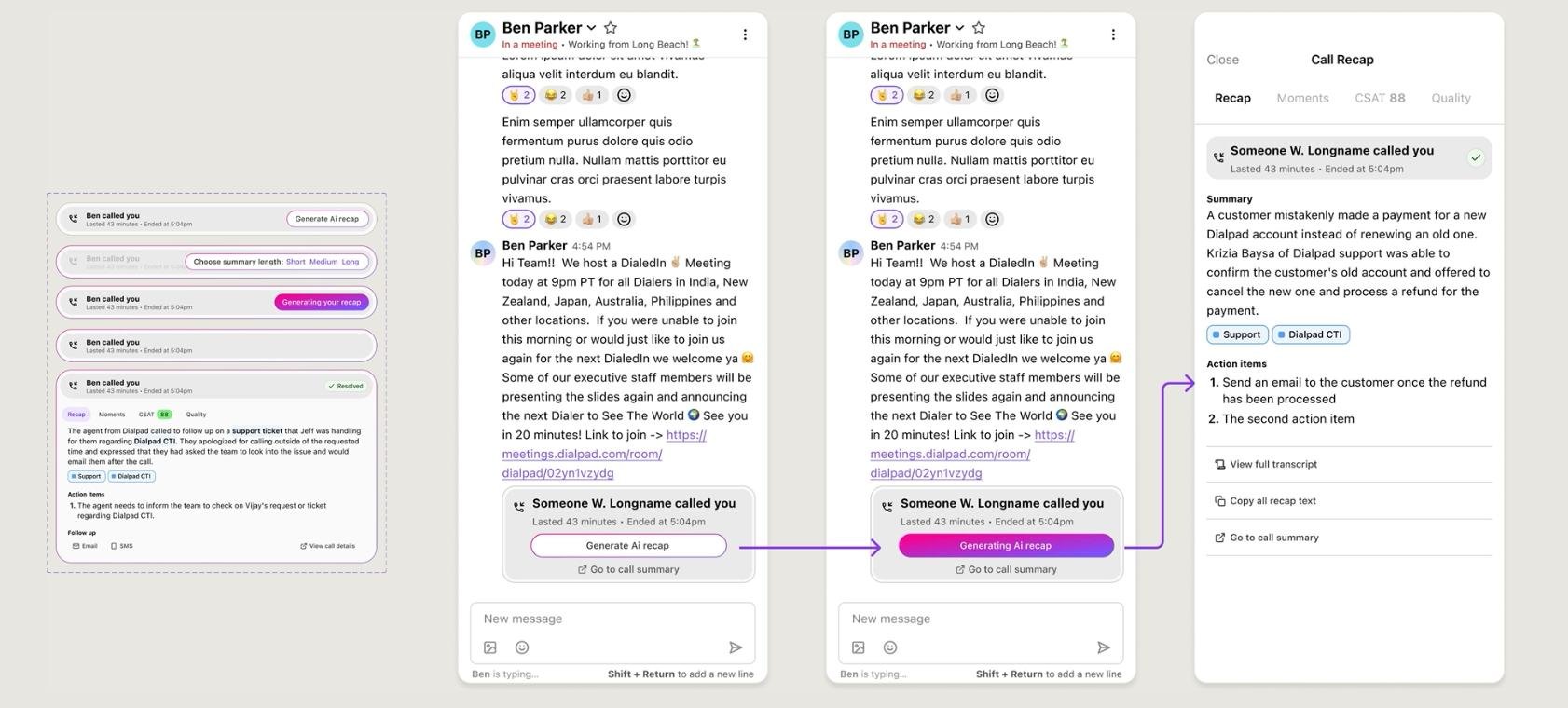
Recap states and the flow on mobile: generate the AI recap from the call pill, then read the full recap
Recap states, and the flow on mobile: from the call pill to the full recap.

Prototype.

From the call pill to the AI recap.

One AI experience. Multiple contexts.

Principles

Designing trust.

What guided every design decision.

  1. 01 AI should explain itselfUsers need confidence.
  2. 02 AI should never interruptContext first.
  3. 03 Human stays in controlSuggestions. Not automation.
  4. 04 Transparency creates trustUsers can always review the source.
  5. 05 AI should feel invisibleIntegrated into existing workflows.

Impact

What changed.

100K+

users with real-time transcription and AI summary, across web and mobile.

After launch

Guidelines adopted org-wideHuman-AI interaction guidelines adopted across the product org.
A Design System ready for AIMy contributions let other teams ship AI features with consistent patterns.

Key learnings

What I took away.

  1. 01 Start with the question, not the screens.Deciding whether this was a tool for agents in the moment or for managers afterwards set the direction for everything else.
  2. 02 One transcript, two audiences.The same data serves different needs: agents need focus, managers need visibility. The third column came from designing for both.
  3. 03 Extending the Design System early pays off.Building the badges and the recap card inside the system made AI feel native, and saved other teams the work.
Designing AI isn't about making intelligence visible. It's about making people feel more capable.

Next case

Yuda

A mobile platform connecting users with verified home service professionals